
Your entire title plant archive, one search away.
TitleFolio Archive is a read-only lookup tool for restored RamQuest title plant archives. Search the SQL records and open every file's documents and images right where they're stored. Nothing is copied, imported, or changed.
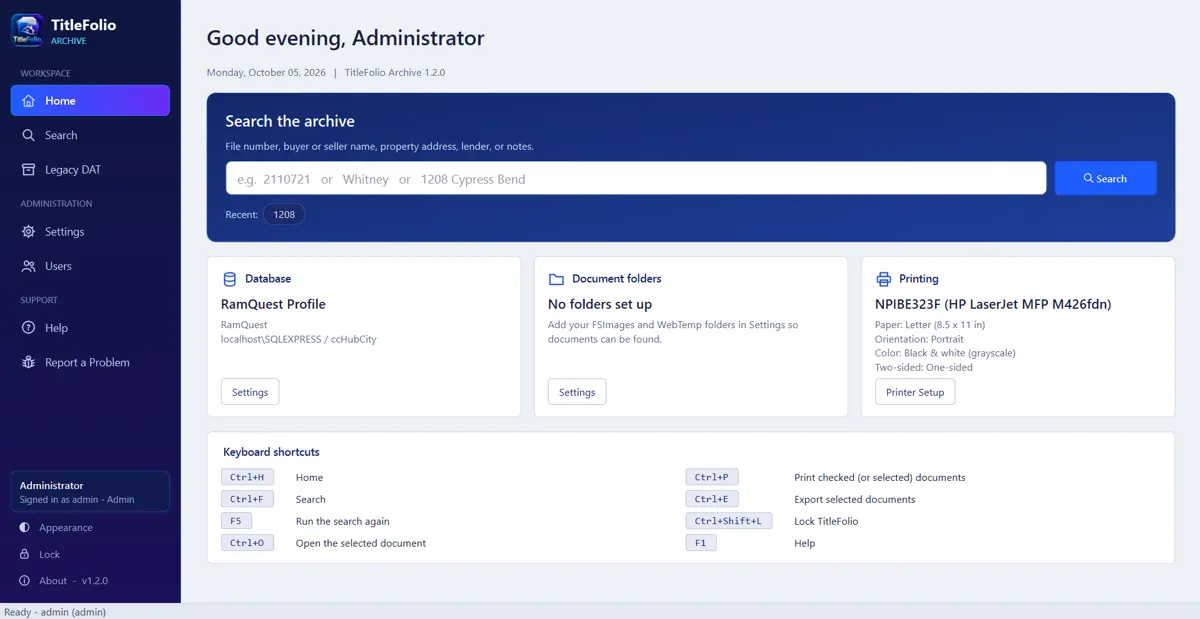
You restored the database. Finding a closed file shouldn't take an afternoon.
Archived title files live in two places: SQL records on one server, and thousands of scanned pages, PDFs and emails scattered across FSImages and WebTemp folders. TitleFolio brings them back together in a single, fast search, without moving a single file.
Search like you remember it
File (GF) number, buyer or seller, property address, lender, or notes. Type what you know and press Enter.
See every document instantly
Preview scans, FileScan pages, PDFs, Office files and emails side by side with the order details.
Print or export in one step
Check what you need across files and searches, then send it all as one print job or export a full packet.
Files, orders, documents and preview, all on one screen.
Pick a file and its order details, documents and a live preview appear together. No more hunting through network shares or guessing file names.
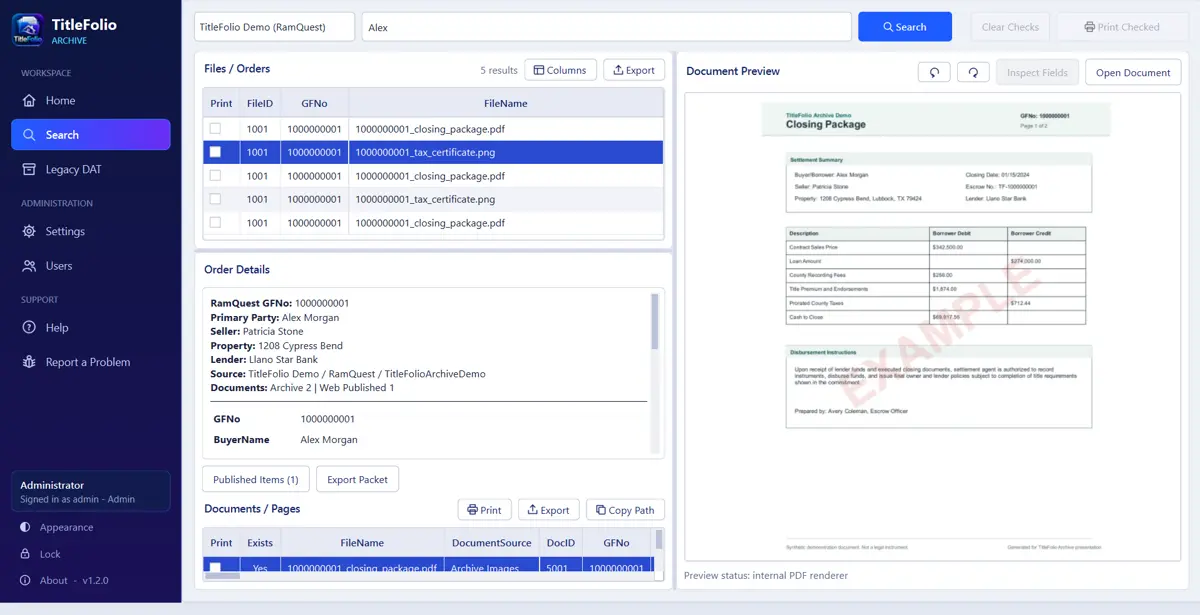
Files / Orders
Choose your columns, drag to reorder, and export results to CSV. Your layout is remembered.
Order Details
Parties, property and lender at a glance, plus Published Items and one-click Export Packet.
Documents / Pages
See whether each document exists, then print, export or copy its path.
Document Preview
Images, PDFs, Word and Excel files, and emails, with Open Document and Inspect Fields.
Everything your closers and examiners need from a closed file.
Documents stay where they are
Point TitleFolio at local or \\server\share folders. A background index keeps lookups fast at any subfolder depth.
FileScan pages preview
Page images with numeric extensions, such as H0011166.080, open right in the preview.
Built-in email viewer
Outlook .msg and .eml files open with attachments, embedded images and forwarded emails. No Outlook needed.
Published Items (WebTemp)
Web-published documents for each file open in their own window, with their own preview.
Export Packet
Copy every document in a file to a folder in one click, ready to share with an underwriter or attorney.
Searches you control
Cancel any search with Esc, slow searches time out with a clear message, and recent searches re-run in one click.
Build a batch. Print it as one job.
Check whole files or individual documents as you move between searches. Your checks are kept, so you can build up a batch and send it all at once, with a progress window and a Cancel button.
- Prints images, multi-page TIFFs, PDFs, Office documents and emails itself
- A clear summary of anything that couldn't print, and why
- Optional cover page before each file and a file-information footer
- Choose whether whole-file printing includes WebTemp documents
Printer Setup
Press Ctrl+P to print checked documents, or the highlighted ones.
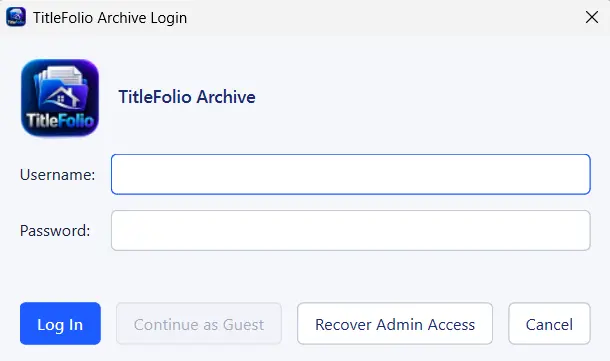
Sensitive closing files deserve real access control.
Named accounts with clear roles, automatic locking, and credentials that never sit in plain text.
| Role | Can |
|---|---|
| Admin | Everything, including Settings, Users and Legacy DAT |
| User | Search, preview, print and export |
| Guest (off by default) | Search and preview only |
Encrypted SQL passwords
Protected with Windows DPAPI, readable only by the same user on the same PC.
Unique recovery codes
Generated per installation, shown once, stored only as salted hashes.
Auto-lock
Locks after 15 minutes idle, or instantly with Ctrl+Shift+L.
Safe email viewing
Remote content never loads, links ask first, risky attachments can't be opened.
Up and searching in four steps.
Install
Run the installer on a Windows workstation or server. Sign in as admin and save your recovery codes.
Connect the database
Create a RamQuest profile, enter your SQL Server details and click Test SQL Connection.
Add document folders
Browse to FSImages and WebTemp, or let Discover Locations suggest them. Indexing runs in the background.
Add users & print
Set up your printer, print a test page, and add up to three named user accounts.
A fresh look, and a lot less waiting.
New Home page
Quick search, recent searches, and live status for the database, folders and printer.
No more import step
The old Repository import is retired. Documents open where they're stored.
Batch printing
Whole files and single documents together, with a new Printer Setup.
Report a Problem
One click creates a bug report to email to support. Passwords and document contents are never included.
SoftPro and AIM support are in development. Preview them under Settings › Coming Features.
Runs on the Windows machines you already have.
Windows
Windows 10 or 11, or Windows Server.
SQL Server access
Network access to the restored RamQuest database and ODBC Driver 17 or 18.
Document folders
Read access to FSImages, and optionally WebTemp.
LibreOffice (optional)
Only needed to preview and print Word and Excel documents.
Standard build
For current Windows workstations and servers, with full PDF preview and printing.
Legacy Server build
For older Windows Servers that can't run Standard. PDFs and Office files open with Open Document.
Bring your archived title files back within reach.
See TitleFolio Archive running against your restored RamQuest data. Read-only, so your archive stays exactly as it is.